Introduction
In modern mobile applications, SSL/TLS encryption is critical for securing data transmitted between the client and the server. To further enhance security, many apps implement SSL Pinning, a mechanism that restricts the app from trusting any certificate other than a specific, pinned one. While this technique improves resistance to man-in-the-middle (MitM) attacks, it also presents a significant challenge during security assessments.
This document outlines practical methods for bypassing SSL pinning in Android applications using tools such as Frida and Objection. The goal is to enable ethical security analysts and penetration testers to inspect and evaluate app traffic, ensuring that proper safeguards are in place and identifying any vulnerabilities that malicious actors could exploit.
What is SSL pinning?
SSL (Secure Sockets Layer) pinning is a security technique used in mobile applications to protect data transmitted between the app and its backend server. While most apps rely on SSL/TLS to establish secure communication channels, they typically trust any certificate signed by a trusted Certificate Authority (CA) listed in the device's operating system trust store.
With SSL pinning, the application is configured to trust only a specific certificate or public key—known as a pinned certificate. Each time the app connects to the server, it compares the server's certificate against the pinned version. The connection is established only when the two match, ensuring a higher level of trust and authenticity.
Why is SSL pinning necessary?
In a typical SSL implementation, the system libraries manage certificate validation using the OS trust store. Developers have limited visibility or control over which certificates are trusted, creating a vulnerability:
An attacker could execute a man-in-the-middle (MITM) attack by adding a malicious certificate to the OS trust store (e.g., via a self-signed certificate or social engineering).
Once inserted, this rogue certificate could intercept and manipulate SSL traffic, exposing sensitive data such as API keys or authentication tokens.
In some cases, even a compromised trusted root CA could be exploited to issue fake certificates for malicious purposes.
SSL pinning mitigates these risks by ensuring that the app only communicates with servers presenting the exact certificate it expects. It blocks attempts to inject custom root CAs or tamper with communication, making it significantly harder for attackers to reverse engineer or intercept sensitive data from the app.
How does SSL pinning work?
SSL pinning embeds certificate information directly into the application, which is then used to validate the server's identity on each connection, preventing unauthorized entities from posing as trusted servers and providing robust defence against MITM attacks.
In short, SSL pinning enhances application security by narrowing the list of trusted certificates and ensuring that only verified server identities are accepted for communication.
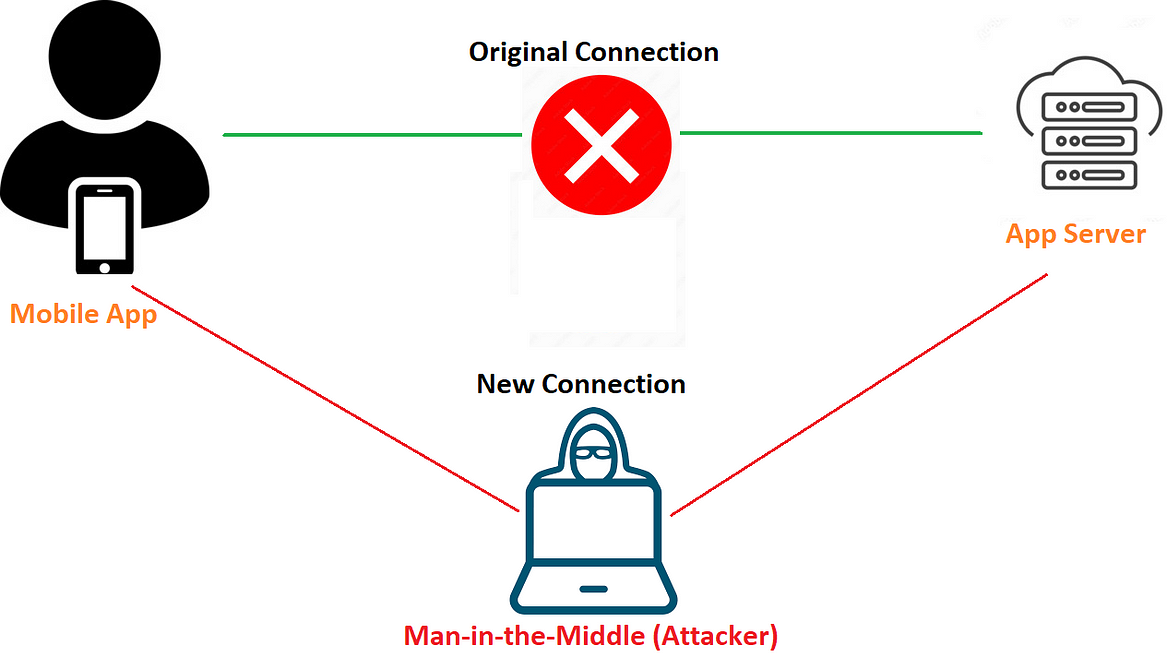
In the illustration above, rather than sending requests directly to the app server, we position ourselves in the middle to intercept the traffic. However, if we attempt to intercept this communication without first bypassing SSL pinning, the application may either crash or display an error message such as "No Internet Connection."
Why do we need to bypass SSL pinning?
Bypassing SSL pinning isn't about breaking apps — it's about understanding them better, spotting flaws, and making them stronger. Here's why it's necessary during a mobile security assessment:
Inspect encrypted traffic: Pinning blocks traffic interception. Bypassing it allows us to analyze how data is transmitted and stored.
Find hidden vulnerabilities: Let's us uncover insecure APIs, data leaks, and other flaws not visible through the UI.
Simulate real attacks: Attackers can still bypass pinning. Testing helps us prepare for that possibility.
Improve app security: Understanding bypass methods helps developers implement stronger defences.
In short: We bypass SSL pinning not to weaken apps, but to better secure them.
Tools required
Android device or virtual device/emulator
Frida scripts
Platform-tools
Burpsuite
Tools setup
Connect the device to adb
Adb stands for Android Debug Bridge. It's an official Android tool for controlling and remotely debugging Android devices.
To perform instructions on our device, we must connect it to adb. To do this, go to Settings >> Developer options and enable debugging on the device so that adb can communicate with it. Enter the following command to check if the device is connected:
adb devices
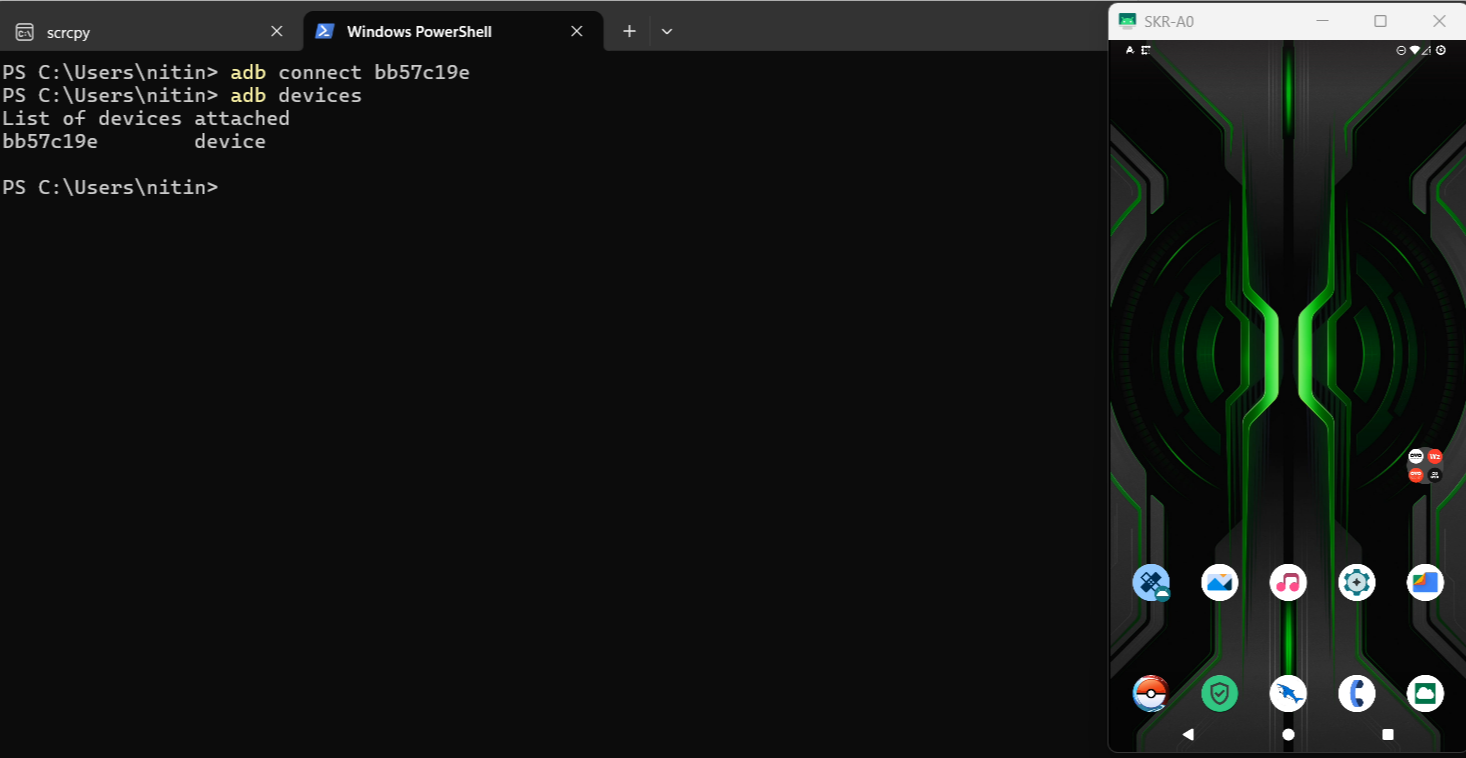
If the device does not show up, use the command below to connect manually.
adb connect <ip of device:port>
Download the Frida server
The Frida server package for our Android device must be downloaded based on its architecture. We can run the command below to find out the architecture of our device:
adb shell getprop ro.product.cpu.abi
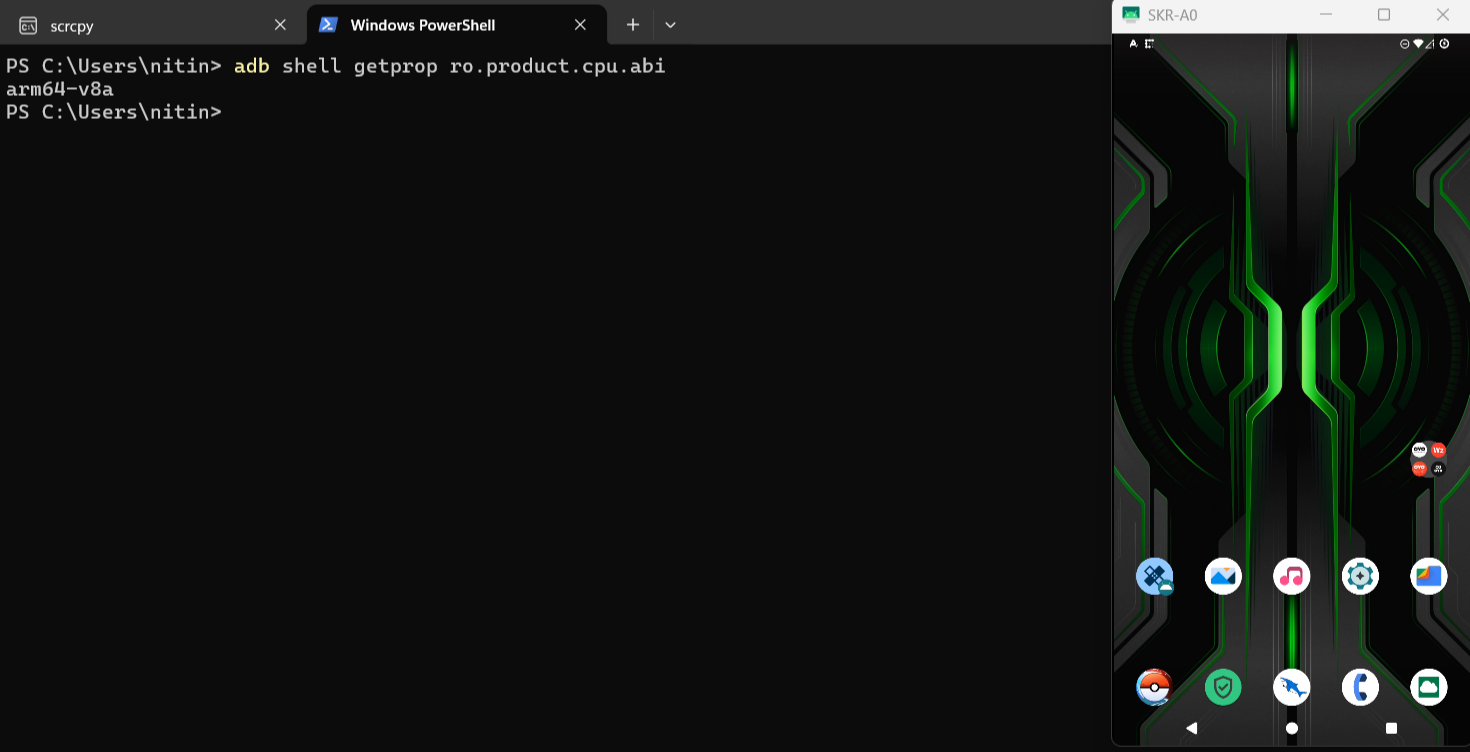
In our case, the device architecture is arm64-v8a.
Pushing the burps certificate
Name the certificate cer.cer and install it on the device in the same location as the frida-server.
adb push <path to cer.cer> /data/local/tmp/cert-der.crt
adb push cer.cer /data/local/tmp/cert-der.crt
Frida server setup
Before injecting our script, we need to start the Frida server on the target device. First, upload the Frida server binary to the device. To do this, copy the frida-server file you downloaded into the ADB directory and rename it to frida-server. Then, run the following command:
adb push <path_of_frida_server_folder><space></data/local/tmp>
adb push "D:\Android Testing\platform-tools\frida-server" /data/local/tmp
Next, we'll give the following permission to the frida-server binary:
adb shell chmod 777 /data/local/tmp/frida-server
Note: Ensure that the Frida tools on your system and the Frida server on the mobile device are running the same version; otherwise, they won’t work together.
Test that Frida is working
After completing the Frida setup, start the Frida server on the device and verify that it is running correctly on your local system.
To check, run the following command:
frida-ps -U -a -i
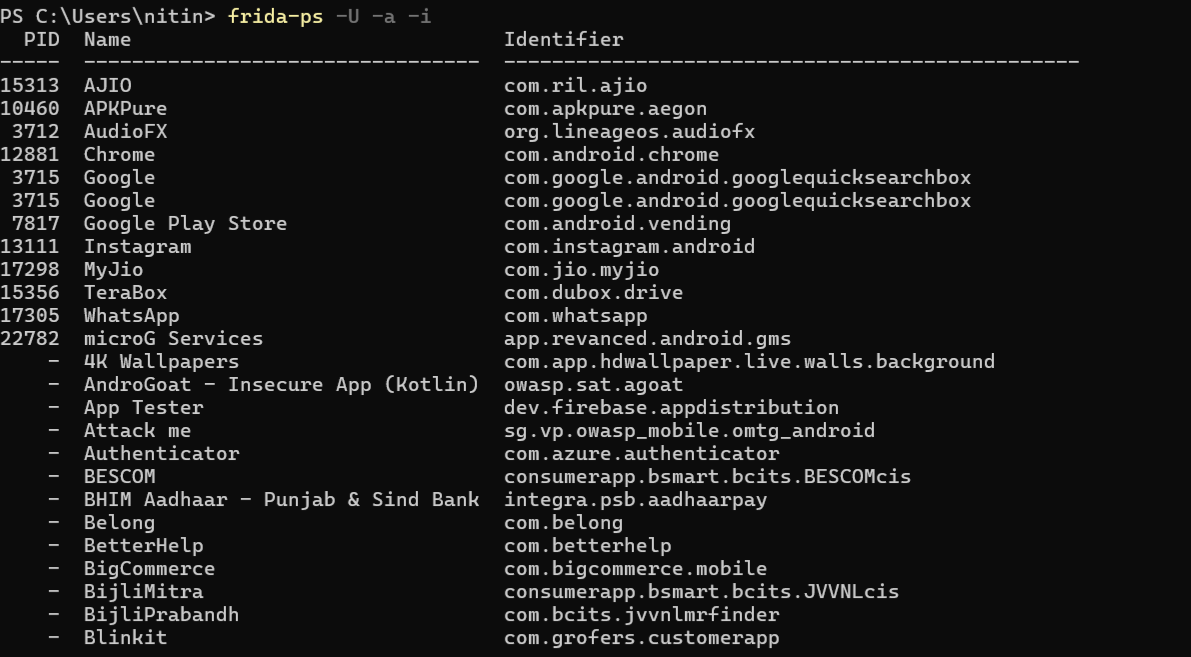
If you are getting a similar output showing the package name, that means the setup is working fine.
Method 1: Frida scripts
There are two primary methods to bypass SSL pinning with Frida:
Local Script Execution: Download a Frida SSL pinning bypass script to your local system and execute it using the Frida client. This gives you full control and the ability to customize the script if needed.
Frida CodeShare: Use scripts directly from Frida CodeShare without downloading them locally. You can execute shared scripts with a single command, making it faster and more convenient for quick testing.
Both methods are effective, and the choice depends on your preference and the level of customization required.
Following command, you can use to execute from Frida codeshare
frida -U --codeshare pcipolloni/universal-android-ssl-pinning-bypass-with-frida -f com.package
The following command can be used to execute if you are using a local Frida script.
frida -l sslbypass.txt -f YOUR_BINARY -U
In the image below, you can see Frida script execution in the Zomato application.
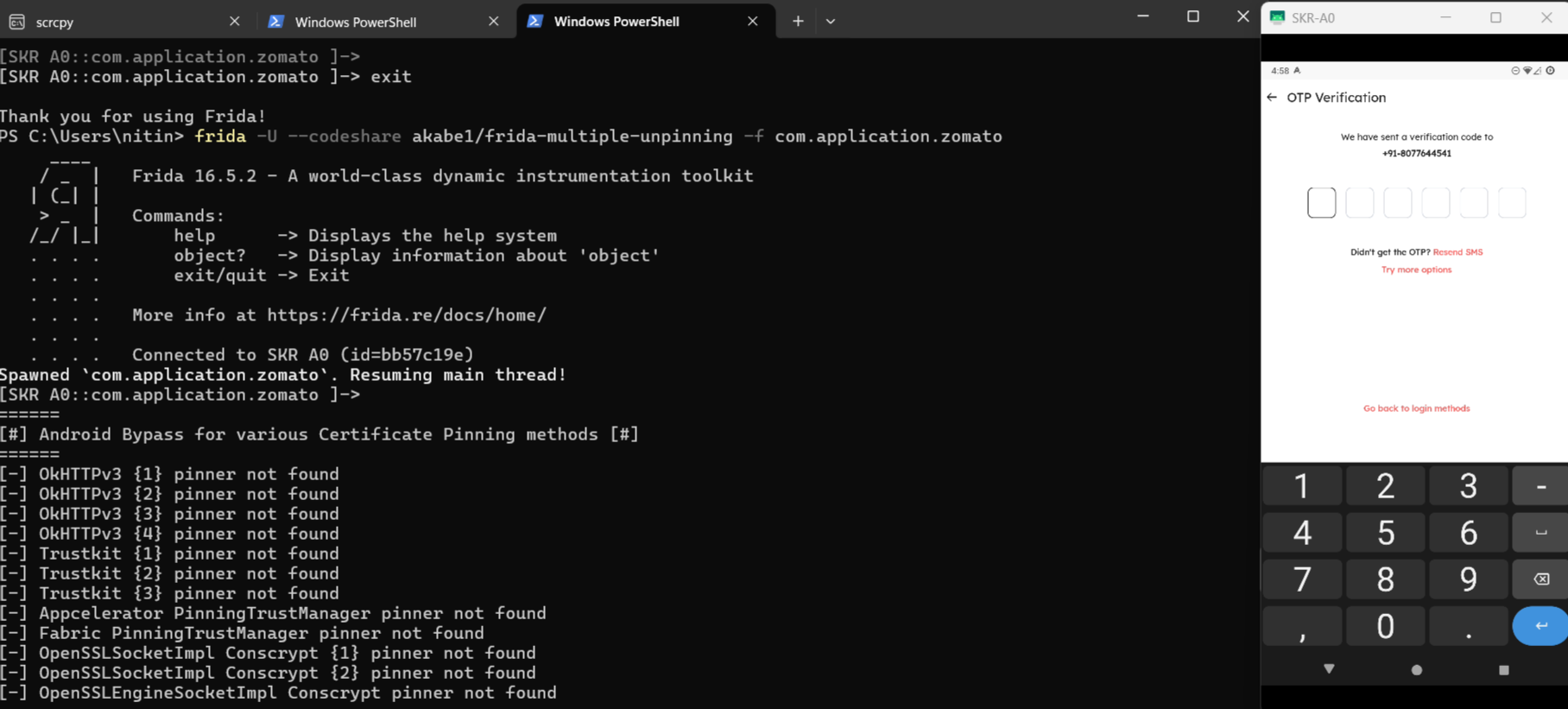
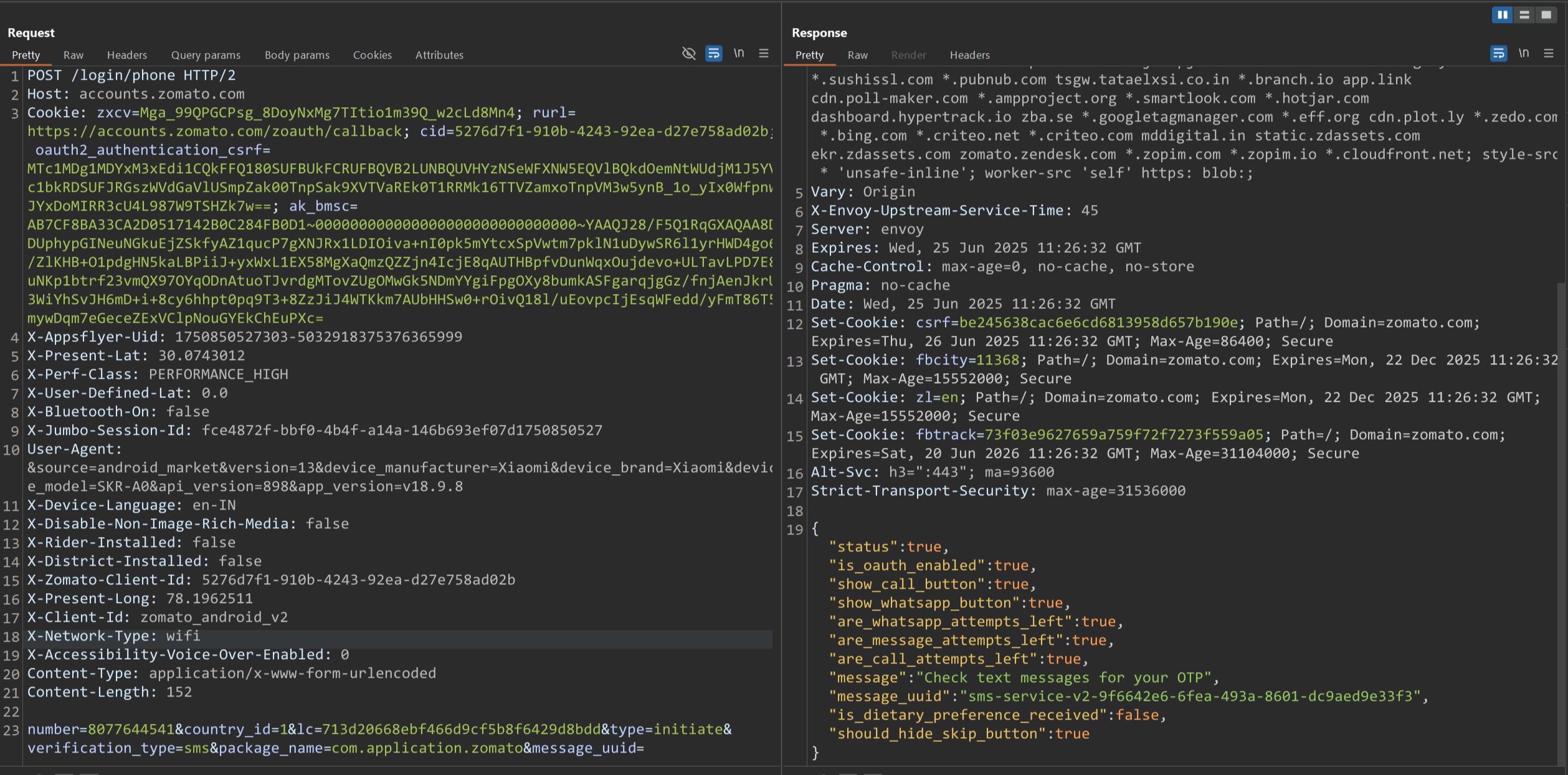
Burp Suite can now intercept all traffic from the target app. As long as we're proxying traffic through Burp Suite, we'll need to keep the Frida server running.
Method 2: Objection tool
Objection is an open-source tool for analyzing and manipulating mobile applications at runtime, without requiring the device to be rooted or jailbroken.
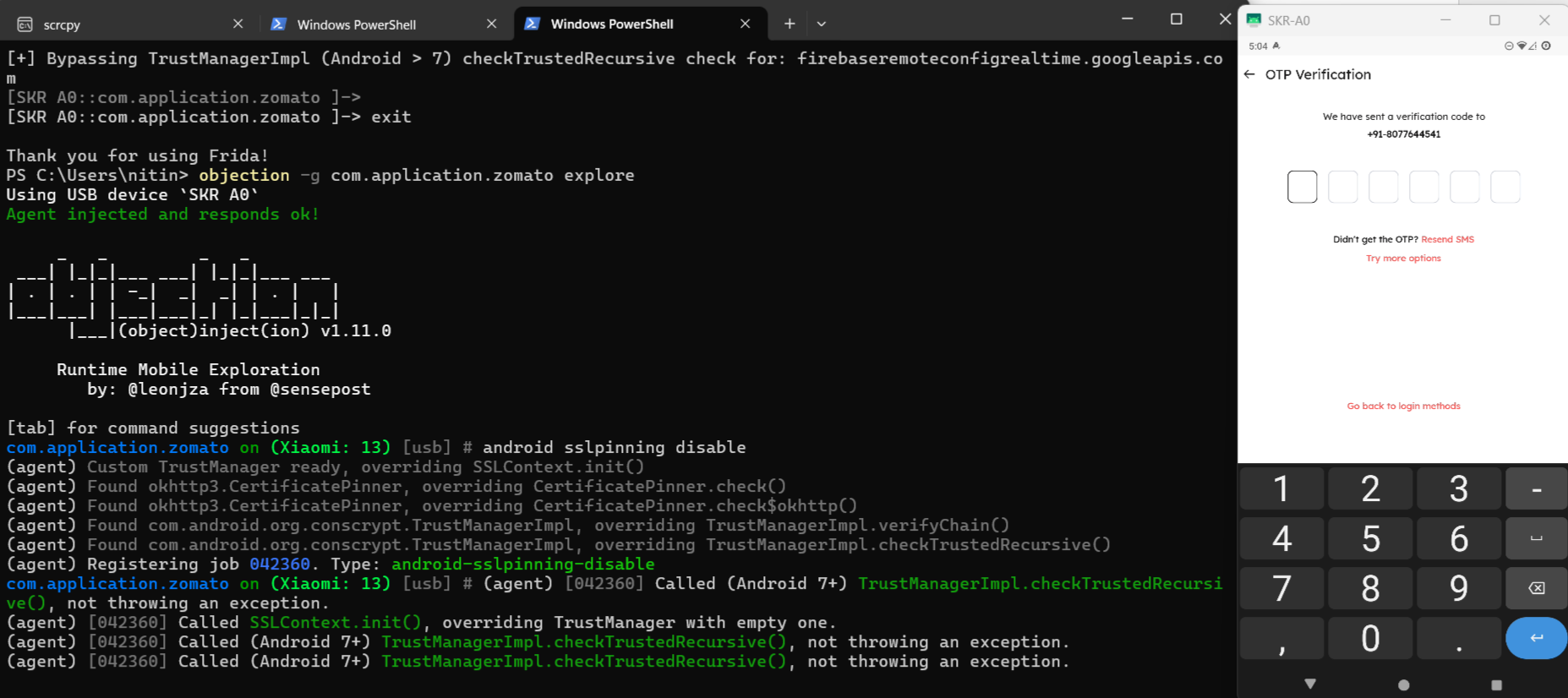
Run the following command to execute
objection --gadget com.application.zomato explore
android sslpinning disable
After executing this command, the application will open automatically, bypassing pinning.
You can now intercept all traffic from the target app.
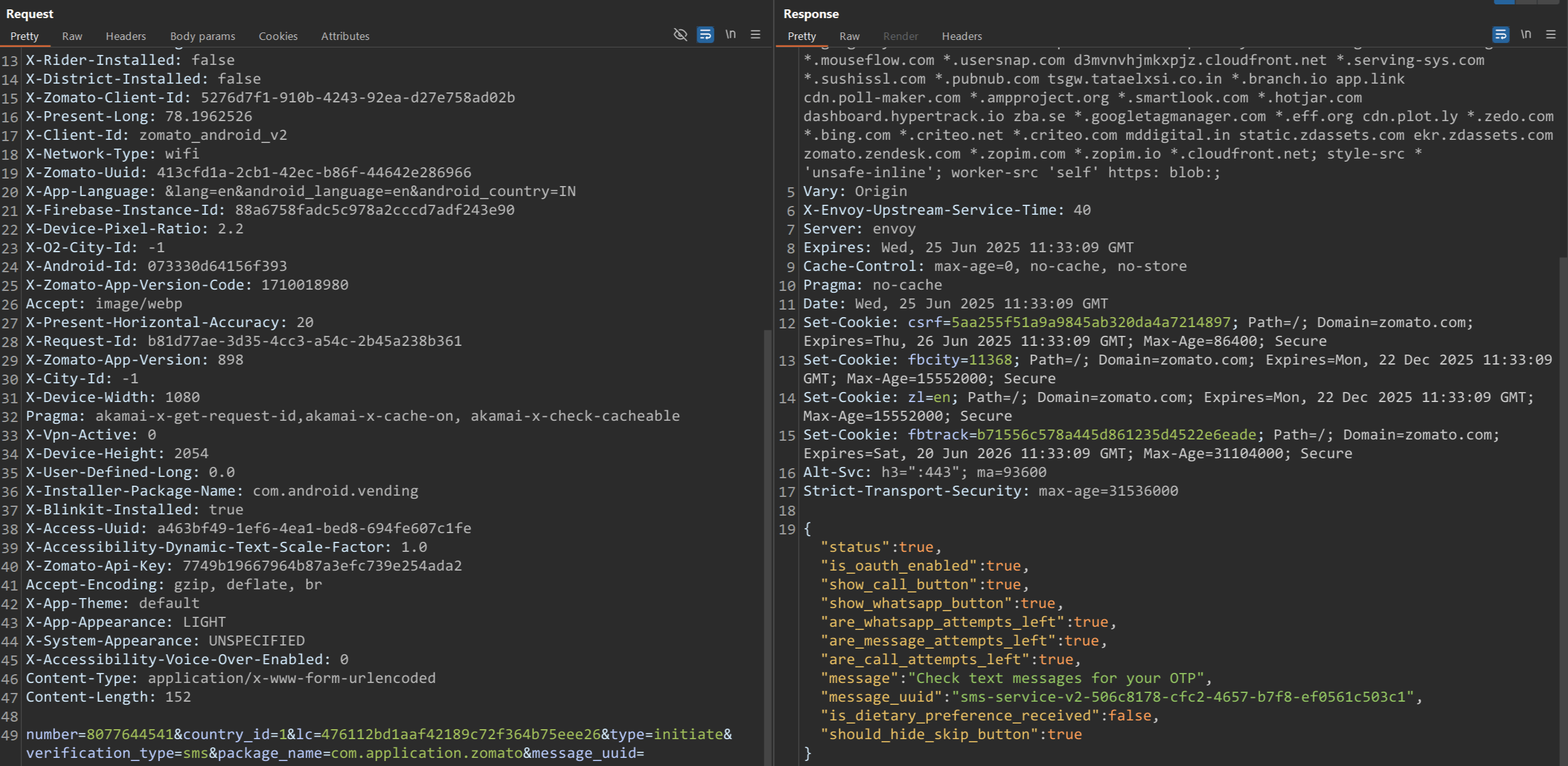
SSL pinning has now been successfully bypassed using both methods. The Zomato app accepts our Man-in-the-Middle (MitM) HTTPS proxy, enabling us to intercept and inspect its network communication.
From here, we can analyze the contents of each request and create rules to modify, mock, or block specific traffic as needed.
Conclusion
SSL pinning is an important defense mechanism that protects mobile applications from MitM attacks. However, for legitimate security assessments, bypassing this protection is essential. This document demonstrates two effective methods for bypassing SSL pinning on Android devices: using Frida scripts and the Objection tool.
By successfully bypassing SSL pinning, we can inspect and analyze network traffic to uncover hidden vulnerabilities, enforce stricter security standards, and ensure the application is resilient against sophisticated real-world attacks. Leveraging these tools responsibly enables security professionals to build more secure and trusted mobile experiences.